
Bookings · 4 min read
Take bookings on your page
Visitors ask for an appointment in your page's chat. Set when they may book once, then answer each request.
-
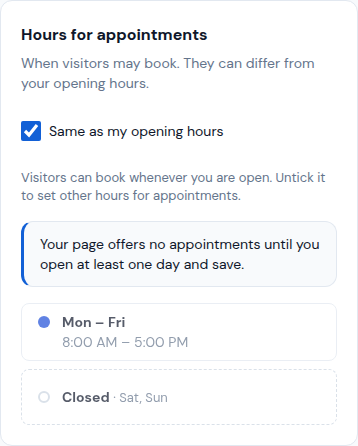
Open Appointments and tap Settings. In Hours for appointments, keep Same as my opening hours ticked, or untick it and set other hours.
-
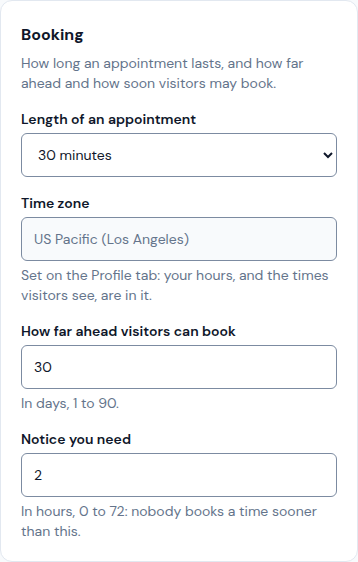
In Booking, choose the Length of an appointment, How far ahead visitors can book (in days) and the Notice you need (in hours).
-
Under Confirming requests, tick Confirm requests automatically if visitors should get their time at once. Leave it unticked to answer each one yourself.
-
Tap Save. Your page offers no appointments until at least one day is open and saved. Block holidays under Days off.
-
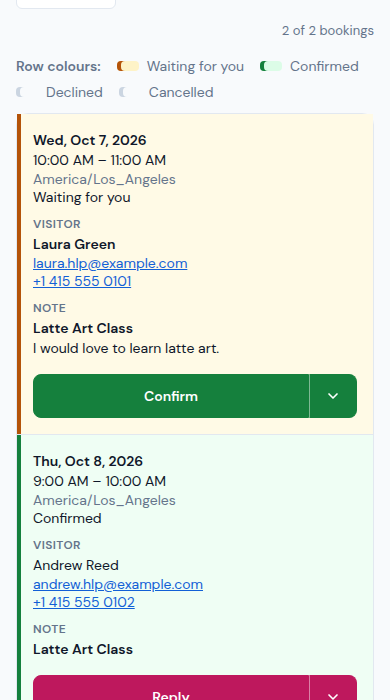
Requests arrive in Appointments › Bookings and by email. Tap Confirm, or open the menu beside it to Decline: the visitor is emailed either way.
Updated October 19, 2026, with the screens as they are now.