
Your AI assistant · 3 min read
Use your own OpenAI key
Your page's chat answers with OpenAI, on Llyner's key. With your own key, it uses yours and OpenAI bills your account. AI key, under the Settings tab, shows only when Llyner has switched it on for your business.
-
Create a key in your OpenAI account (platform.openai.com › API keys) and copy it.
-
Open Settings, then AI key.
-
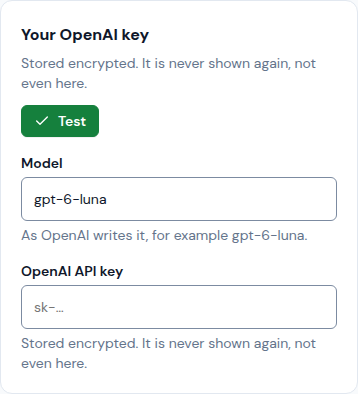
In Your OpenAI key, check the Model (as OpenAI writes it) and paste the key in OpenAI API key.
-
Tap Test: it says "OpenAI accepted this key" when it works. Then tap Save. The key is stored encrypted and never shown again.
-
The view now says your chat uses your own key. Remove key goes back to Llyner's.
Updated October 20, 2026, with the screens as they are now.