
Account and plan · 3 min read
Change your plan
Each page has its own plan. You change it in the business's Settings tab, under Plan, and pay by card on Stripe's secure page.
-
Open your business, tap Settings (on a phone, it may be under More), then Plan. Your plan says which plan you are on and what it includes.
-
On the Free plan or in a free trial, Plans lists the plans you can switch to, with their price a month and what each includes. Tap Switch to … on the one you want.
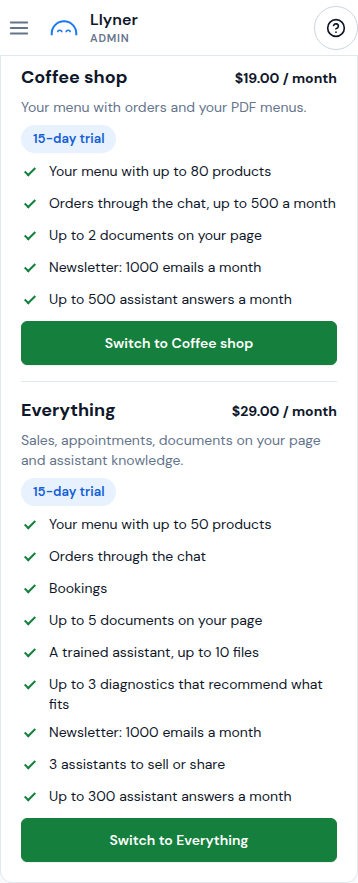
-
Stripe's page opens: write your card there and pay. Llyner never sees your card. Back in Plan, your new plan shows once Stripe confirms it, usually within a minute.
-
Already paying? Under Add to your plan you can add a module your plan doesn't include. Manage card or cancel opens Stripe to change your card or cancel.
-
Usage and limits shows what your page uses of each limit this month. To raise a limit, change your plan or write to us from Support.
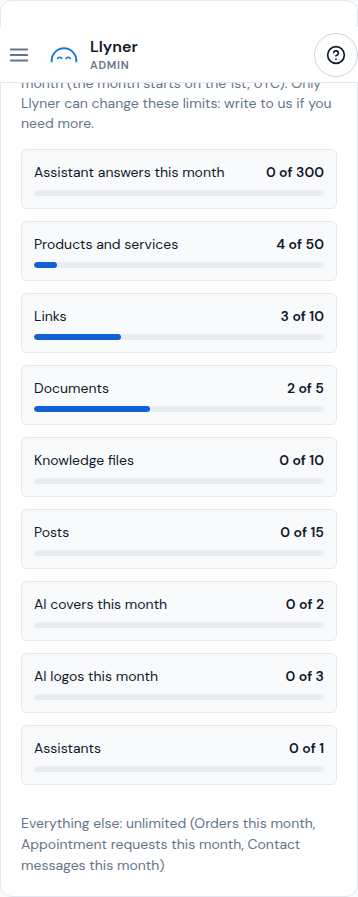
A page on the Founder plan is free for life: there is nothing to pay or change.
Updated October 20, 2026, with the screens as they are now.