
Account and plan · 4 min read
Use Llyner from Claude, ChatGPT or Telegram
Ask Claude, ChatGPT or another AI app about your orders, bookings and messages, and let it act for you. Or get your orders in a Telegram chat and answer them with a tap.
-
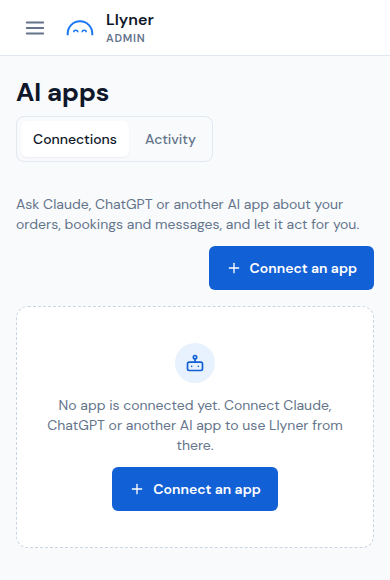
Tap ☰ at the top left, then AI apps. Tap Connect an app.
-
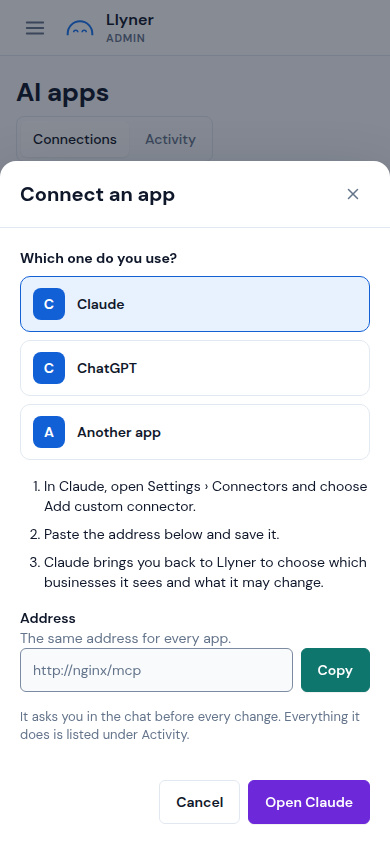
Pick the app you use: Claude, ChatGPT or Another app. Follow its three steps: in the app, add a custom connector and paste the Address shown (tap Copy).
-
The app brings you back to Llyner: choose which businesses it sees and what it may change, and allow it. It asks you in the chat before every change, and everything it does is listed under Activity.
-
For Telegram, pick Telegram in Connect an app (it shows when Llyner's bot is on). Tap Open Telegram, or scan the code from a computer, and tap Start in the chat with the bot. The link works for 10 minutes.
-
Back in AI apps, each connection has a menu to change what it may do, see its Activity or Disconnect it. For Telegram, Settings chooses the businesses and what it notifies you about.
Your account › Connected apps shows what is connected; Open takes you here.
Updated October 19, 2026, with the screens as they are now.