
Getting started · 2 min read
Find your way in the admin
The admin is where you change your page. On a phone everything is one tap away from the top of the screen.
-
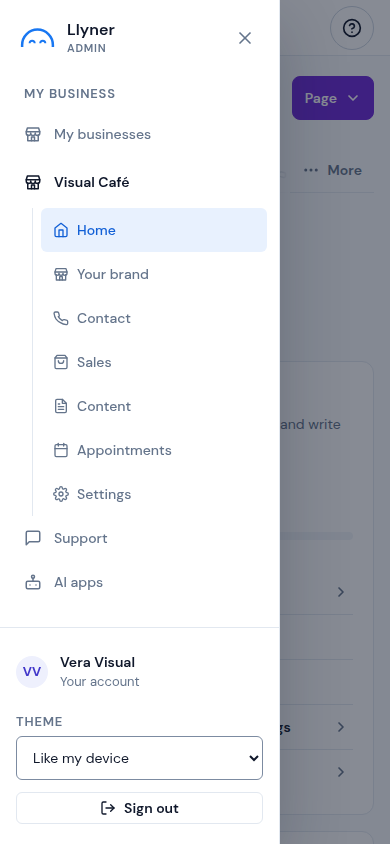
Tap ☰ at the top left to open the menu. Under My business you find My businesses, the business you have open with its tabs, Support and AI apps. At the bottom are Your account, Refer a friend (on a paid plan), the Theme and Sign out.
-
With more than one page, My businesses lists them all: tap Manage on the one you want.
-
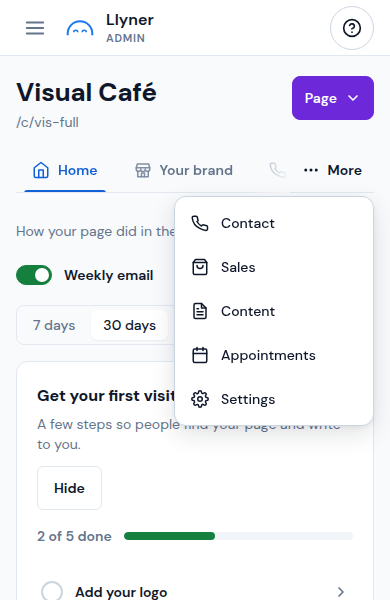
A business opens on Home. Its tabs run along the top: Home, Your brand, Contact, Sales, Content, the others your plan brings and, last, Settings (your plan and, when Llyner switches it on, your own AI key). The ones that don't fit are under More.
-
Some tabs have views under them, like Sales: Products, Orders, My clients and Settings. Tap one to switch.
-
Page at the top right opens View page, to see your page as your customers do, and Share · QR.
Updated October 20, 2026, with the screens as they are now.