
Your page · 3 min read
Put your menu on your page (a PDF or a link)
Put your menu on your page as a PDF, or link to the menu you already have on another site. Your customers open it from your chat.
-
Open Content › Library. It lists the links, PDFs and posts your page shows, in their order.
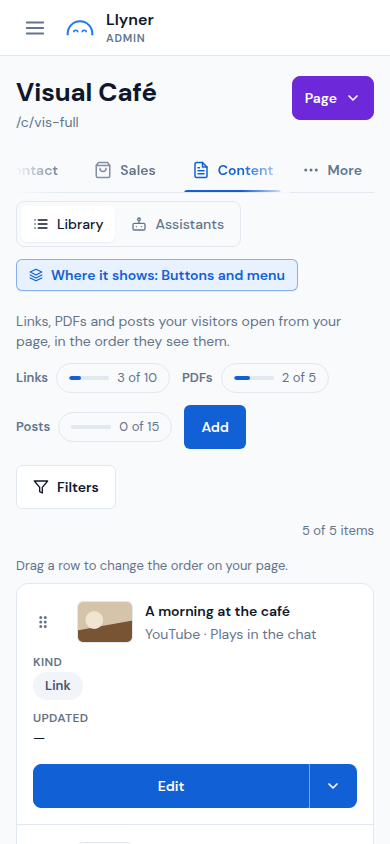
-
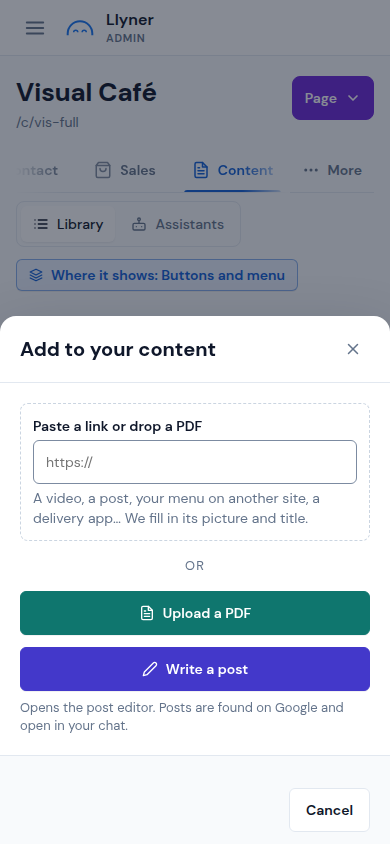
Tap Add.
-
To upload your menu as a PDF, tap Upload a PDF and choose the file. Name it Menu (that is what its button on your page says) and tap Add PDF. PDFs come with a paid plan.
-
If your menu is already online (your website, a delivery app), paste its address in Paste a link or drop a PDF, check its title and tap Add link.
-
To change where it shows on your page, tap Where it shows: Buttons and menu. To take orders from the menu, add your dishes as products in Sales.
Updated October 19, 2026, with the screens as they are now.