
Selling and orders · 5 min read
Sell something you make after they pay
Some things do not exist until someone buys them: a report about their business, a plan, a design. Sell it as Something made to order: the buyer pays first, you make it, and you deliver it as a PDF or a link. They receive it by email.
-
Open Sales › Products, tap New product and pick Access.
-
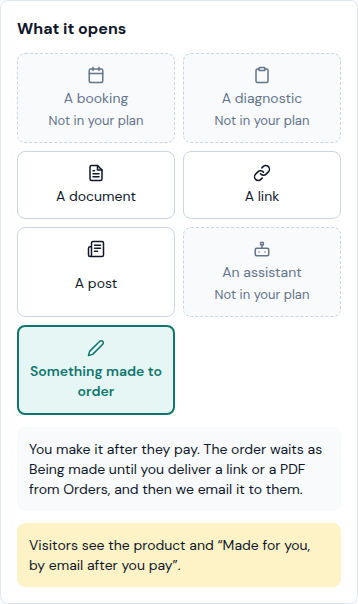
Under What it opens, tap Something made to order. There is nothing to pick from a list: the card explains that you make it after they pay and deliver it from Orders. Ready within (optional) says how long it takes, in hours or days: buyers then read "By email, within 48 hours" on their order and its emails, not "when it's ready".
-
Write its name and its Price, and tap Save. The price is fixed: without one, the product cannot be saved (Set a price: buyers pay before you make it.). A price of 0 makes it free, but it still waits for you: you deliver it like any other. You can sell several of these products on one page.
-
Buyers pay before you make it, so your page needs Card, online or Transfer (When they get it does not count). If it offers neither, the card warns Buyers can't order it yet and the link Sales › Settings takes you to set one up (see "Get paid by card or with a payment proof"). Until then visitors read "Not available right now".
-
What the buyer sees: the product says Made for you, by email after you pay. They can order it alone or with other access products (a PDF, a link…), not with a physical product or a service in the same order; the chat asks them to place another order for the rest. After they pay, their order card reads Paid, then Being made, and when you deliver it, Ready, with a Download or Open the link button. Its "How you get it" line and the delivered email say Ready: we emailed it to you.
-
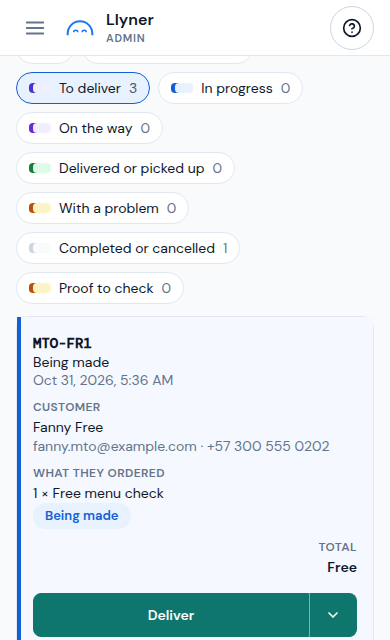
When a made-to-order order is paid, it moves by itself to Being made and you are told: a number on the Orders tab, an email and, if you use Telegram, a message. In Sales › Orders, the To deliver chip lists these orders.
-
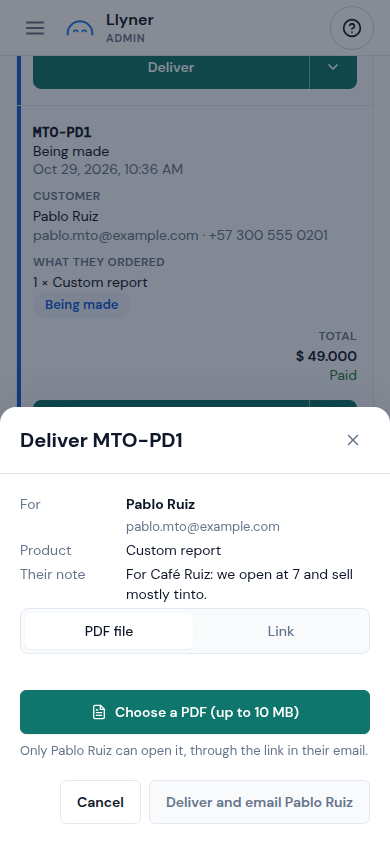
Make it, then tap Deliver on the order. The window shows who it is for, the product and Their note. Pick the PDF file (up to 10 MB) or the Link (write it whole, starting with https://) and tap the main button, Deliver and email with your buyer's name. The order is Ready; the buyer gets an email with their button, and only they can open the PDF.
-
An order with two made-to-order products first asks Which product are you delivering?: deliver each one on its own; the order is Ready when the last is delivered.
-
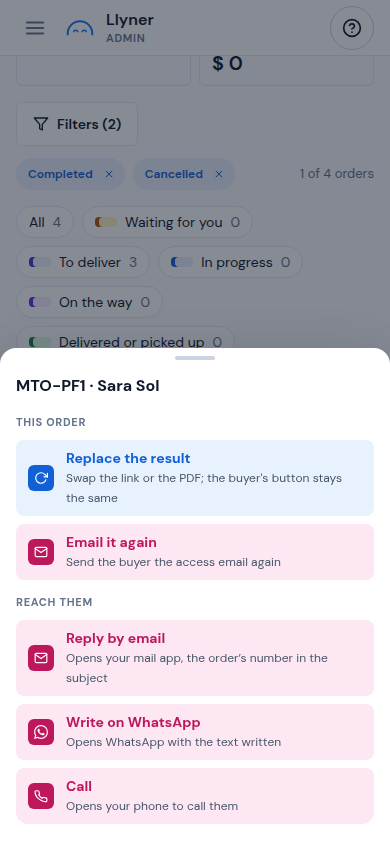
Made a mistake? Tap ▾ beside the order: Replace the result swaps the link or the PDF (the buyer's button stays the same; tick the box Email (their name) the new one if you want them told) and Email it again sends the access email once more. Once delivered, nothing takes it back.
-
Before delivering, Cancel order is still there (its menu also has Mark as not paid for a payment you recorded). The order does not go through Start preparing, Send or the other steps: Deliver replaces them.
-
For a notice in Telegram, open AI apps, Settings on your Telegram connection and keep Paid orders to deliver on (see "Use Llyner from Claude, ChatGPT or Telegram").
Updated October 31, 2026, with the screens as they are now.